![venari-security-logo-2022-1.png]](https://vhub.venarisecurity.com/hs-fs/hubfs/Imported%20images/venari-security-logo-2022-1.png?height=40&name=venari-security-logo-2022-1.png)
1. Identification of Customer Contacts
Effective communication is critical to providing timely and efficient technical support. During the initial onboarding process, Venari Security ensures that a primary point of contact from the client's organization is identified. This individual will act as the main liaison between the client's technical team and Venari Security’s technical support team.
The primary contact's role includes:
- Receiving communications: This person will receive all updates, notifications, and critical communications related to technical support, incident reports, and system updates.
- Escalation management: The primary contact will be responsible for coordinating internal escalations within their organization and will be the primary recipient of escalations from Venari in the event of critical incidents or service disruptions.
- Request coordination: They will also handle and coordinate requests for support, feature changes, bug fixes, or updates, ensuring that the right information is passed between the client’s teams and Venari Security’s support team.
In some cases, additional contacts from the client’s side may be identified for specific roles, such as:
- Secondary contacts for out-of-hours support or holidays: These are people who can be reached outside the usual working hours in case of critical incidents, especially for clients who require 24/7 support.
- Specialized contacts for different services: Depending on the scope of the project, the client may also assign specialized contacts responsible for different areas, such as security, compliance, or infrastructure management.
It is vital that this information is kept up to date to avoid communication delays, especially during urgent situations. Regular reviews of contact information are advised, especially after internal reorganizations or role changes within the client’s team. Venari Security will maintain a record of the identified contacts to ensure efficient communication at all stages of the support process.
2. Communication Channels with Support
Venari Security offers a range of communication channels for clients to access technical support, ensuring flexible and responsive service. The channels are designed to cater to various levels of urgency and provide efficient resolution of technical issues.
Venari Security provides support during the following business hours:
- Hours: 8:00 AM to 5:00 PM UTC
- Days: Monday to Friday
-
Support via Ticketing Platform:
Clients are encouraged to use the Venari Security Support Portal as the primary channel for all support inquiries. Through this portal, clients can submit new support tickets, monitor the progress of existing tickets, and communicate directly with the support team. The platform allows for comprehensive tracking of all issues, providing transparency and ensuring that requests are handled according to their urgency and complexity. Each ticket is assigned a unique reference number, which clients can use to track the issue until its resolution. Additionally, clients can access the portal to review FAQs, documentation, and previously resolved tickets for self-help. -
Email Support:
For clients who prefer email, Venari Security provides a dedicated email address for support inquiries: support@venarisecurity.comEmail submissions automatically generate a ticket in the support system, ensuring that all requests are logged and tracked. This channel is convenient for providing detailed descriptions of issues, along with any necessary attachments such as screenshots, logs, or configuration files. Clients are encouraged to include all relevant details to help expedite the troubleshooting process.
-
Phone Support:
For critical issues that require immediate attention, clients can contact the Venari Security support team via phone at the following number: +44 20 3821 5418
This channel is particularly useful for Priority 1 (P1) incidents, such as system outages or severe operational disruptions, where a swift response is necessary. Phone support ensures real-time communication with the technical team, allowing for faster issue escalation and resolution. Phone support is available during regular business hours, and in cases of P1 incidents, there are options for escalation outside of standard hours.
For detailed instructions on how to contact the Venari Support team, please refer to this document.
3. Escalation Procedures for Critical Incidents:
Venari Security follows a clear escalation process for managing high-severity incidents. For more details on response and resolution times, please see the "Business Impact and Response Times" section.
-
Initial Incident Identification:
- Upon receiving a high-priority incident, Venari’s support team will immediately begin troubleshooting.
-
Internal Escalation:
- If the issue is not resolved in a reasonable time, the incident is escalated to senior engineers.
-
Management Involvement:
- For unresolved critical issues, the incident escalates to Venari’s management, ensuring priority allocation of resources.
-
Client Communication:
- The client is updated throughout the process until the issue is resolved.
This structured escalation ensures that critical incidents are addressed with maximum efficiency.
4. Conditions for Accessing Support
To provide efficient support for Venari solutions, customers must ensure that each request includes the necessary details to help the technical support team understand and diagnose the issue quickly. Below are the required conditions and information clients need to provide when reaching out for support:
- Issue Summary:
The client should provide a clear and concise description of the problem they are encountering with the Venari solution (such as the V-Comply, V-Sensor, or V-Discover). This summary should mention any relevant error messages, unexpected system behavior, performance issues, or service disruptions. For example:- If the issue is related to a specific feature within V-Comply (e.g., data ingestion, insights generation), it should be explicitly mentioned.
- If sensors are affected, these should also be included in the description.
- Business Impact and Response Times:
Clients should indicate how the issue is affecting their business operations, as this helps Venari prioritize the request based on its severity.
Critical Incident (P1)
Definition:
A problem severely impacts the use of V-Comply or V-Discover in a production environment and there is no viable workaround. It may affect visibility or monitoring of critical assets.
Targeted Initial Response Time:
Raised by phone – 1 hour or less, during business hours
Targeted Resolution Time:
4 hours
Follow-up Updates:
Every 60 minutes
Examples:
-
V-Discover or V-Comply are completely inaccessible preventing security teams from conducting any domain scans or get security insights about TLS traffic.
-
V-Comply is generating corrupted compliance reports.
-
The sensor is no longer receiving any mirrored traffic.
High Priority (P2)
Definition:
The system is partially degraded or some important features are not working correctly. A workaround exists, and core functionality is available.
Targeted Initial Response Time:
Ticket or email – 4 hours or less, during business hours
Targeted Resolution Time:
8 hours
Follow-up Updates:
Every 4 hours
Examples:
-
V-Comply dashboard is accessible, but compliance rules cannot be edited or saved.
-
A single sensor is not syncing to the backend while others are working fine.
Medium Priority (P3)
Definition:
Non-critical issue that does not affect immediate use of the product. These are often visual, UX/UI issues, or known bugs with little to no operational impact.
Targeted Initial Response Time:
Ticket or email – 4 hours or less, during business hours
Targeted Resolution Time:
48 hours
Follow-up Updates:
Only when status changes or further info is needed
Example:
-
Minor display issue in V-Comply Regulation reports.
Low Priority (P4)
Definition:
General questions, feature suggestions, or requests for technical advice/documentation. No impact on functionality.
Targeted Initial Response Time:
Ticket or email – 1 business day or less
Targeted Resolution Time:
7 days
Follow-up Updates:
When status changes or further info is needed
Providing a clear business impact allows Venari to allocate resources effectively and ensures that High-priority issues are escalated quickly while lower-priority issues are handled appropriately based on the client’s needs.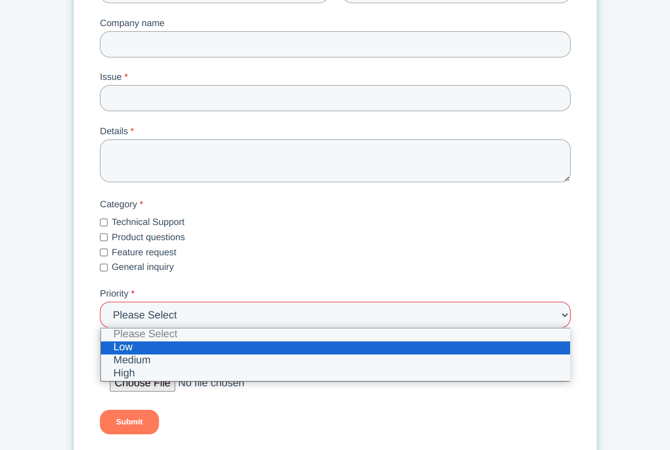
- Logs and diagnostic data: If applicable, clients should include logs, relevant screenshots, or any data that may help the support team reproduce the issue.
5. Availability SLA
| SLA | Service Level | Description |
| V-Discover and V-Comply Availability | 95.0% | This Service Level measures the percentage of uptime in which all applicable service layers are fully operational |
6. Updates and Evolutions
- Venari Security follows a structured update policy. Typically, a new version of V-Comply and V-Sensor is released monthly. For V-Discover, updates are less frequent.
- Product versions are named according to their release year and month (e.g., a version released in December 2026 is named 26.12.x).
- Clients are encouraged to submit requests for product changes, feature evolutions, and bug reports.
7. Ticket Closure Policy
Venari Security has established the following ticket closure policy to ensure efficient follow-up and customer satisfaction:
- If a ticket is awaiting client input and no response is received within 14 days, the ticket will be closed.
- Exceptions are made if the client explicitly requests that the ticket remains open or if the Support & Operations team identifies a need to keep it open.